Inventory Control Software for Plant Stores
Inventory control for plant stores, layered over your ERP: ABC-XYZ classification, three days-of-cover figures, ageing on two clocks and capped non-moving provisions — sliced by buyer, procurement class, project and model.
Watch with transcript →1:10 · captions · narrated demo
Software Modules
Complete Inventory Control Modules
Screens from the running system — click a module to preview

Dashboard Overview
Main features including objectives, benefits, and functionality of the inventory control system.
Inventory control that shows its denominators
MileSoft Inventory Control is an analytics layer for plant stores that sits above the ERP rather than replacing it. A background service uploads daily receipts, issues and stock from SAP or another host system into a central database, and authorised users reach the dashboards over the plant network. The ERP stays the system of record; every figure is computed from data the plant already trusts, and every screen states when the extract last ran.
It answers the questions an on-hand balance cannot: which parts are overstocked weighted by value, which slow movers are tying up capital, which lots are ageing out, and whose portfolio is drifting against target. Days of cover is reported on three denominators so a planning error can be told apart from a recent change in demand; ageing runs on receipt age and consumption age so dead stock still on replenishment is caught; and ABC-XYZ classification keeps a separate band for parts with no consumption signal.
Every report is the same position cut by plant, procurement class, buyer and manager, project, model and part, joined through a central part master. That is near-real-time analytics over a daily extract — right for classification, ageing, provisioning and buyer review, and deliberately not a substitute for shop-floor stock confirmation.
Inventory control software
An ERP answers how much is on hand. Inventory control answers the five questions after that
None of them is a level. Each is a rate, a ratio or an age, and each needs a denominator the transaction record does not supply.
Buyers, planners and operations leads need five answers every day: which parts are overstocked weighted by value, which slow movers are tying up capital, what is drifting in demand pattern, which lots are ageing out, and which suppliers are quietly inflating safety stock. A buyer running classification in a monthly spreadsheet is four weeks behind every demand shift. This layer sits above the ERP rather than replacing it — IEC 62264 separates the system of record from inventory management for exactly that reason — so every figure is downstream of data the plant already trusts.
| Dimension | The question it answers |
|---|---|
| Plant | Are we above or below target overall, and in which direction are we moving? |
| Procurement class | Which class carries the overhang — domestic, group, consumption-driven, export-peculiar or imported? |
| Buyer and manager | Whose portfolio is drifting, and against what target? |
| Project | What is allocated to a given programme, at what value? |
| Model | How is stock distributed across product models? |
| Part | Consumption pattern, stock level and last transaction for one part number |
Procurement class is the dimension least often found elsewhere and the most useful: imported and export-peculiar parts have structurally longer lead times and different day targets, and averaging them into one plant figure hides both. All of it joins on a central part master holding group, procurement type, buyer, manager, project and model — the least glamorous component, and the one that decides whether a deployment succeeds.
Days of cover
Days of cover: why one figure hides the argument, and three put it on the screen
Inventory in days is the stockroom's flow time. The dispute is always about which consumption rate to divide by.
days of cover = stock value ÷ mean daily consumption value
This is Little's Law applied to stock. Two consequences: the figure is comparable only over a window in which demand did not shift, and reducing stock without reducing days of cover is not an improvement — it is a proportional fall in consumption.
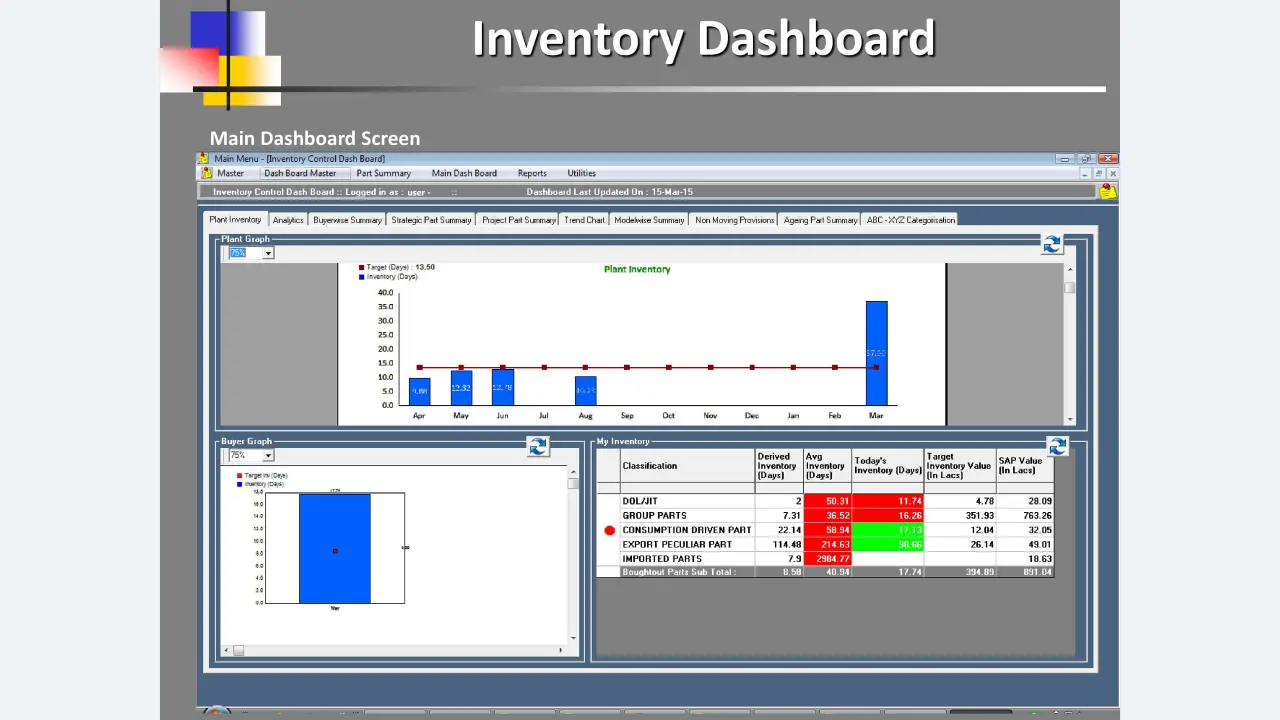
So three figures are reported per procurement class: derived days against the planning-norm consumption, average days over the period, and today's days against recent consumption. When they agree, nobody needs to look. When they diverge, the gap says where.
Worked example: a class that looks inside target and is not
A class holds 763 lakh of stock. The planning norm assumed 104 lakh a day of consumption; the trailing twelve-month mean was 20.9; the last thirty days averaged 46.9. Derived: 7.3 days. Average: 36.5 days. Today's: 16.3 days. Against a 13.50-day plant target, a plant watching only the derived figure believes it is comfortably inside — while holding more than twice the target.
Derived far below average says the planning norm assumed five times the consumption the plant achieved — a planning error, fixed in the norm. Today's below average says consumption has recovered. One number cannot tell a buyer which conversation to have.
Inventory ageing analysis
Inventory ageing needs two clocks, or it misses the worst stock in the building
Receipt age says how long stock has been here. Consumption age says how long since it was used.
Ageing is usually reported as receipt age alone. Its blind spot is a part still on automatic replenishment that nothing consumes: receipts keep arriving, so receipt age stays small and the part never appears on an ageing report, while consumption age grows without bound. One live row in the product shows exactly that shape — last receipt seven days ago, last consumption 1,328 days ago. A receipt-age report files it as under thirty days old, and the schedule that keeps it looking fresh is the one quietly buying more.
Worked example: four parts, ranked by one clock and by two
| Part | Since receipt | Since issue | Reading with both clocks |
|---|---|---|---|
| P1 | 7 days | 1,328 days | Dead stock still being replenished — the worst case, and invisible to receipt ageing |
| P2 | 803 days | 805 days | Genuinely dormant; both clocks agree |
| P3 | 513 days | 511 days | Genuinely dormant; both clocks agree |
| P4 | 195 days | 30 days | Bulk-bought working stock — flagging it for disposition would be an error |
One clock ranks them P4, P2, P3, P1 — exactly backwards at both ends. Two clocks rank them P1, P2, P3, and leave P4 alone. Ageing brackets run 0–30, 31–60, 61–90 and above 90 days, on both clocks.
ABC-XYZ analysis
ABC-XYZ classification with a fourth band for parts with no signal
Value against demand variability, and an honest place for the parts that have no variability to measure.
ABC ranks parts by consumption value, following Dickie's 1951 observation that a small share of part numbers carries most of the value. XYZ adds demand variability, which is what makes differentiated policy possible: a high-value stable part and a high-value erratic part need the same attention and opposite safety stocks. The matrix here carries four value bands — A+, B, C and D — against X, Y and Z.
The D band exists because a part with no consumption in the classification window has no computable variability. Putting it in Z would assert high variability where the truth is no signal at all; separating it keeps Z meaning *erratic* rather than *unknown*. Cells switch between part count, value and days — a cell holding 3% of parts and 38% of value is a different management problem depending on which you read.
Most automotive part numbers have intermittent demand — long runs of zero broken by occasional orders. A moving average over such a series is biased (Croston, 1972; Syntetos and Boylan, 2005, tested on three thousand automotive series). An estimator that is wrong for intermittent demand puts parts in the wrong XYZ band, and the policy that follows is differentiated in the wrong direction.
Non-moving inventory
The non-moving provision, capped at what the ERP actually holds
The quantity a policy calls for and the quantity that exists are different numbers.
non-moving quantity = lesser of (policy provision quantity, quantity the ERP holds)
Where policy calls for a provision against 219 pieces and the ERP holds none, the provision is zero — the stock was already scrapped or consumed, and booking against it would double-count a write-down that has already happened.
Worked example: where the cap bites
Four parts with policy and host quantities of (3,391, 3,391), (219, 0), (794, 10) and (162, 214) give non-moving quantities of 3,391, 0, 10 and 162, and a provision of 46.36. Taking the policy quantity uncapped gives 63.74 — 37% too high, entirely from parts whose stock is not in the building. The fourth part shows the other direction: the host holds 214, but only 162 meet the non-moving criterion. Stated as a computation, the provision is reproducible from two stored quantities and survives audit.
Stated plainly
Near-real-time analytics over a daily extract, and what that can and cannot support
A background service uploads daily receipts, issues and stock from the ERP, and the screen states when it last ran.
A daily cadence is right for every decision this system supports — classification, ageing, trend and provisioning all run on a weekly-to-monthly rhythm. It is the wrong cadence for shop-floor stock confirmation, which belongs to inventory tracking and the warehouse management system. The honest description is near-real-time analytics over a daily extract, not real-time inventory.
| Supported | Not supported |
|---|---|
| Classification and re-banding | Shop-floor stock confirmation before a pick |
| Ageing and non-moving identification | Allocation of a specific piece to a specific order |
| Days-of-cover reporting against target | Preventing a stockout that develops within the day |
| Buyer and supplier performance review | Real-time available-to-promise |
| Trend and forecast input | Any decision whose window is shorter than the refresh |
Evaluating inventory control software
Eight questions to put to any inventory control software
Each is answerable by demonstration — including by us.
| # | Dimension | Ask the vendor to demonstrate |
|---|---|---|
| D1 | Stated denominator | For any days-of-cover figure on screen, which consumption rate is underneath it? |
| D2 | Multiple denominators | Are derived, average and instantaneous figures shown together, or reconciled into one? |
| D3 | Two ageing clocks | Can it list parts received this month that have not been consumed in two years? |
| D4 | No-signal band | Where does a part with zero consumption in the window land — the erratic band, or its own? |
| D5 | Provision capped at on hand | Show a part whose policy provision exceeds host quantity. Which number is booked? |
| D6 | Procurement class | Can imported and domestic parts carry different day targets, or is there one plant number? |
| D7 | Intermittent-aware variability | Which estimator computes the variability band for a part with eleven months of zeros? |
| D8 | Stated cadence | How old is the data on screen right now, and does the screen say so? |
D8 takes ten seconds and settles more than the rest. A system that displays its own extract timestamp has decided to be honest about a limitation; one that does not has decided the opposite.
On evidence: this product appears in no published MileSoft case study, and no outcome is claimed for it. MileSoft publishes a model of manual effort automated — five people spending three hours a day on inventory data, 60% of it automated, about 2,700 hours a year — in which the 60% is an assumption to interrogate. The better framing is lag rather than headcount: the cost of a four-week-old classification falls on stock decisions, and stock is where the capital is.
Standards referenced: ISO 22400-2, IEC 62264-1 / ISA-95, IEC 62264-3, ISO 28000, GS1 General Specifications, ISO/IEC 15459-1. Derivations are in the inventory control method paper.
Features
Key Features
Built-in capabilities that set our software apart
Daily ERP extract
receipts, issues and stock uploaded from SAP or another host, with the refresh date on screen
Three days-of-cover figures
derived, average and today's, per procurement class, against a plant target
Two-clock ageing
0–30, 31–60, 61–90 and 90+ day brackets on receipt age and on consumption age
ABC-XYZ with a no-signal band
A+, B, C and D value bands against X, Y and Z variability
Capped non-moving provisions
the lesser of policy quantity and quantity the ERP holds
Buyer, project and model summaries
every report cut along the dimensions procurement actually manages
Central part master
group, procurement type, buyer, manager, project and model, searchable on several parameters
Benefits
Key Benefits
What your team gains from adopting our platform
Testimonials
What Our Clients Say
Trusted by industry leaders across manufacturing, HVAC, and logistics.
"The software features, such as real-time monitoring and alerts, have proved invaluable in optimizing machine operations. MileSoft team's professionalism, technical expertise, and dedication to meeting our requirements have been impressive."
FAQ
Inventory Control Software — FAQs
Answers to the most common questions about this product. Need more? Book a demo or reach out via Contact.
How does this differ from a WMS?
What is ABC-XYZ classification?
What is days of cover, and why report three?
Why does ageing need two clocks?
Where does the data come from?
Explore More
Related Products
Complementary tools teams often pair with this solution
Related Reading
Go deeper
Explore the long-form story behind this product.
Three Clocks and Two Ages: Days of Cover, Receipt Ageing versus Consumption Ageing, and the Denominator Problem in Inventory Analytics
Architecture, Computational Methods, and a Modelled Scenario for MileSoft Inventory Control
Read the paperRead the full Inventory Control Software for Plant Stores deep-dive
Read articleSee how MileSoft delivers in Industry 4.0
Read case studySee your savings in under a minute
Estimate the time and cost this tool could give back — free, instant, no sign-up.
See your stores on three denominators and two clocks
Share an extract of receipts, issues and stock. We will show days of cover three ways per procurement class and list the parts still being replenished that nothing consumes.