AHU Selection, Design & Costing Software for Air Handler Manufacturers
Design, select, and cost air handling units in one guided workflow — drag-and-drop section design with a live schematic, one-click 2D CAD drawings, and SAP-coded BOMs — tailored for EUROVENT, AHRI, and ASHRAE certified companies.
Runs on certified performance data
Watch with transcript →1:53 · captions · narrated demo
Software Modules
AHU design software, module by module
Explore our comprehensive suite of AHU manufacturing tools — click any module to preview

AHU Dashboard
A unified control center displaying project status, tasks, cost, and timelines — enabling quick decision-making and better resource planning.
AHU engineering software on certified performance data, audit-ready by design
MileSoft AHU Selection Software is a purpose-built engineering tool for Air Handling Unit manufacturers and MEP consultants who need to size, configure, and document AHUs at tender quality in a fraction of the time a spreadsheet would take. A guided 5-step wizard — Project Info, AHU Configuration, Section Design, BOM & Costing, and Reports — runs on EUROVENT and AHRI-certified performance data for every section (cooling coil, heating coil, filter, fan, mixing box, humidifier, sound attenuator), so selections survive scrutiny during tender review, LEED documentation, and on-site commissioning. It is the modern, web-based alternative to error-prone Excel selection sheets.
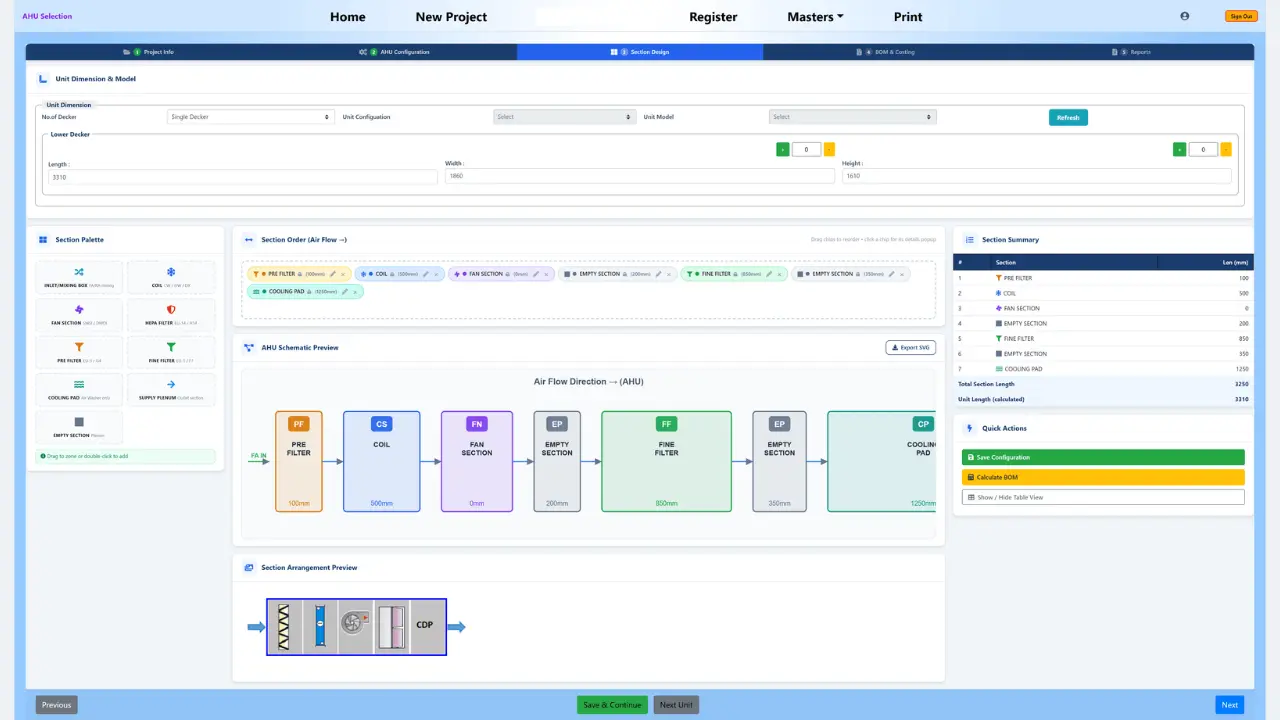
Section Design is fully visual: drag sections onto the air-flow path, reorder them instantly, and watch a live AHU schematic redraw as you build the unit — then export that schematic as an SVG or, with a single plugin, a 2D CAD (DXF/DWG) general-arrangement drawing. No manual redrawing in a separate CAD package. The configurator also handles the complexity real projects throw at it: hundreds of AHUs of different configurations, multi-stage approval workflows, bulk edits, and consolidated project-level BOMs.
As sections are added, the tool builds a real-time, per-decker Bill of Materials with SAP part codes, quantities, unit rate, and amount across every cost category — casing, coil, damper, fan, motor, filter, heater/UVGI, and cooling pad — with unit price, discount, and final AHU amount. BOMs export to CSV, Excel, or straight into SAP, Oracle, or Microsoft Dynamics ERPs via REST API, and one-click branded reports bundle equipment specs, performance data, and BOM into a submission-ready offer.
The platform works alongside MileSoft's FCU, Chiller, ERV, DX, and Lifecycle Cost Analysis tools in a shared project workspace, so a complete HVAC solution can be designed and documented in one place. HVAC manufacturers, system integrators, and consulting engineers across the USA, Canada, Europe, the Middle East, and India use MileSoft AHU Selection to compress weeks of engineering work into hours — without giving up the certification layer that tenders demand.
Features
Key Features
Built-in capabilities that set our AHU software apart
Visual Drag-and-Drop Section Design
Build the AHU by dragging sections onto the air-flow path and watch a live schematic redraw as you go.
One-Click 2D CAD & SVG Export
Generate a 2D CAD (DXF/DWG) general-arrangement drawing and SVG schematic from a single plugin — no manual redrawing.
SAP-Coded BOM & Live Costing
Auto-generate a per-decker bill of materials with SAP part codes, quantities, rates, and real-time cost tracking.
EUROVENT / AHRI Certified Data
Every selection runs on certified performance data, keeping units tender-compliant and audit-ready.
Accelerated Design-to-Production
Slash lead times with automated workflows from engineering to shop floor.
Fewer Manual Errors & Rework
Built-in validation catches mistakes before they reach production.
Costing & Quotation
AHU costing and quotation, emitted by the selection engine
Not a spreadsheet beside the selection — the same engine that resolves performance resolves the price.
Detached costing is the usual arrangement: the bill of materials is built in a separate sheet from the selection, so a late coil change updates the price or the performance, but rarely both. The gap is only discovered when the unit is built, or when a tender is challenged. MileSoft removes the gap by emitting the bill of materials from the selection engine itself, per decker and per tag — change the coil and capacity and cost move in one action.
Accessories behave the same way. View glass, magnehelic and differential-pressure gauges, limit switches, louvers and unit legs are configured on the unit, so they reach the bill of materials automatically instead of being appended to the quotation by hand — the single most common source of margin leakage in AHU estimating.
That makes the tool usable by the estimating and sales side of an air handler business, not only by design engineers. Because unit price, discount and final amount derive from the configured unit, a costed offer can be produced straight from a customer's requirement instead of waiting for an engineering pass — and the same project then moves through configuration, BOM and offer submission without anyone re-entering data.
| Column | What it holds |
|---|---|
| SAP part code | The procurement identity of the line, not a description |
| Cost category | Casing, coil, damper, fan, motor, filter, heater/UVGI, cooling pad |
| UOM | Unit of measure carried through to the ERP |
| Quantity | Resolved from the configured section, per decker |
| Rate | Unit rate applied to the line |
| Amount | Line value, rolling up to unit price, discount and final amount |
Custom & Standard Units
Custom-built and catalogue air handlers in one configurator
Air handler, air handling unit, AHU — the same equipment, and the same workflow whichever your market calls it.
North American teams usually say air handler; teams in EMEA and Asia say AHU or air handling unit. MileSoft covers the same work under either name, and the configurator does not assume which kind of manufacturer you are.
Step 2 sets the unit's identity — certification, unit category, air balancing across fresh, return and supply airflow, panel construction, damper face velocities and orientation. Step 3 then builds the unit section by section along the air-flow path, so a bespoke configuration has no fixed template to fight against.
For a catalogue range, the Section Master stores reusable standard section templates. A standard unit is then configured as quickly as it is quoted, while the same project can carry fully custom units beside it. Direct-expansion air handlers share the certified coil library with DX unit selection, so a DX air handler is selected on the same data rather than in a second tool.
Outputs
AHU manufacturing software outputs: what goes to procurement, the client and the shop floor
Three artefacts come out of one configuration — and they cannot disagree with each other.
Per-decker bill of materials
A manufacturing instruction rather than a commercial total: every line carries its SAP part code, so it exports to SAP, Oracle or Microsoft Dynamics over CSV, Excel or REST without being retyped.
Submission-ready offer report
Step 5 lists every unit in the project, locks the offer, and prints the branded offer report — so the quotation describes the unit that was actually configured.
2D CAD general arrangement
The live schematic exports as SVG, and a single plugin produces a DXF/DWG general-arrangement drawing from the same configuration — no redrawing in a separate CAD package.
Benefits
Key Benefits
What your team gains from adopting our AHU platform
Why Us
Why choose MileSoft AHU selection software
Built for AHU Success
Purpose-built for AHU manufacturing — covering every step from inquiry to delivery.
One Platform, Complete Control
Visual section design, live schematic, one-click 2D CAD, costing, BOM, and reporting in one unified system.
Speed Up Manufacturing
Automated configuration and real-time dashboards cut lead times and boost productivity.
Trusted by Industry Leaders
Top HVAC manufacturers scale production with accuracy, consistency, and quality.
FAQ
AHU Selection Software — FAQs
Everything HVAC engineers and manufacturers ask before adopting our AHU platform.
What is AHU Selection Software?
What makes MileSoft AHU Selection Software different from other AHU selection tools?
Is MileSoft AHU Selection EUROVENT or AHRI certified?
Can I generate a Bill of Materials automatically?
Can it generate 2D CAD drawings?
Can the software handle complex projects with many AHUs?
Does it integrate with ERPs or CAD tools?
How much does it cost, and is there a demo?
Can it handle AHU costing, quotation and offer reports?
Is it useful for AHU sales and estimating teams, not just design engineers?
Is air handler software the same as AHU software?
Explore More
Related HVAC Products
Engineering tools teams pair with AHU Selection to design complete HVAC systems
FCU Selection Software
Size terminal Fan Coil Units across zones with AHRI-certified performance data.
Learn more →Chiller Selection Software
Plant sizing with IPLV/NPLV part-load efficiency modeling to AHRI 550/590.
Learn more →ERV Selection Software
Model air-to-air energy recovery effectiveness to AHRI 1060 alongside your AHUs.
Learn more →DX Selection Software
Multi-circuit direct-expansion analysis on the same certified coil library as AHU.
Learn more →Lifecycle Cost Analysis
Compare AHU, FCU, and Chiller options on 20-year total cost of ownership.
Learn more →See your savings in under a minute
Estimate the engineer-hours and cost AHU Selection could give back — free, instant, no sign-up.
Upgrade your air handling
software today
Reduce manual errors, accelerate engineering, and improve customer satisfaction — whether designing modular AHUs, custom-built systems, or advanced filtration units.