Annual Inventory Tagging & Stock Verification Software
Annual inventory tagging done at receipt, not at year end. Every bin gets its own barcode sticker the moment stock is inwarded, and every issue, dispatch, adjustment and move is booked against that barcode, so a physical stock verification checks tagged bins against a bin-level record instead of starting from a blank count sheet.
Watch with transcript →1:44 · captions · narrated demo
Software Modules
Annual Inventory Tagging Modules
Screens from the web release, with demonstration data — click a module to preview

Dashboard
Stock health against minimum levels, location occupancy, monthly inward and stock by supply area, with one-click shortcuts to the daily transactions.
Physical stock verification starts at receipt, when each bin is tagged
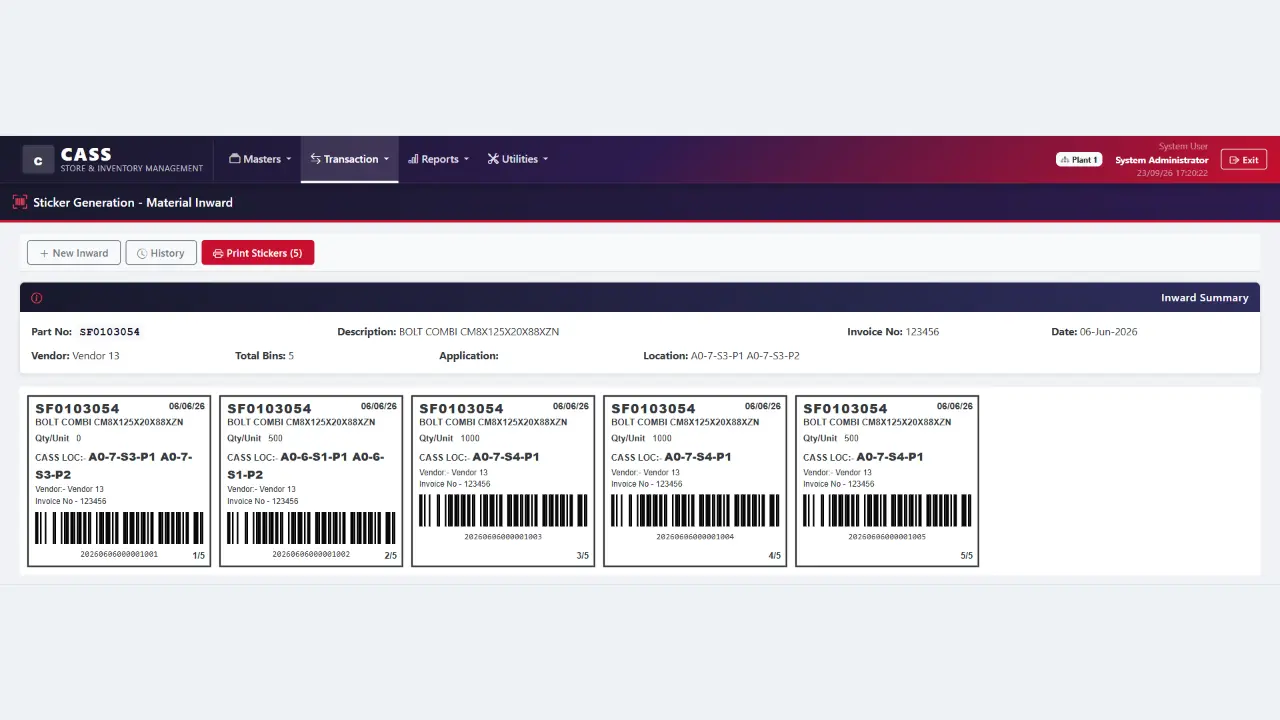
MileSoft Annual Inventory Tagging is a web-based store and inventory system built on one idea: a physical inventory can only check what carries its own identity. At material inward the operator records the invoice quantity and the quantity actually received, and the system splits the receipt into bins at the part's standard bin quantity. Each bin gets a barcode sticker printed with the part, the quantity in that bin, its storage location, the vendor, the invoice and its place in the set.
From then on every movement is booked against the bin's barcode. Pick lists come from a production schedule imported from Excel, or are built part by part, with a first-in-first-out preview of which bins to pick. At dispatch, scanning a picked bin marks it off its list, with a running count of scanned against total. A direct issue scans a bin, takes all or part of it and records the line-side location it went to. A stock adjustment is booked against one bin with a written reason, and a bin moved to another rack is re-pointed by scanning it, with the change logged.
The result is a bin-level book: for any part, which bins exist, where each one sits, what it received and what has been issued from it. That is what an annual physical stock verification checks against. Between counts, the dashboard shows stock health against minimum levels, parts about to go short, how many storage locations are occupied and how long stock has been sitting.
Physical stock verification
A physical stock verification is a measurement, and most of its variance is counting error
A variance report mixes stock that is missing with stock that was counted wrongly. Those need opposite responses.
For most plants and stores the annual physical count is the most disruptive event of the year: movements stop, counters fan out with sheets, and the variance list that comes back is long. Most of it is not shrinkage. A store that cannot separate genuine loss from counting error cannot act on either, and books adjustments against discrepancies that never existed. Four error terms recur every year, and each has a structural answer:
| Error term | How it arises | What a tagged store changes |
|---|---|---|
| Double count | The same stock is counted twice by different counters | Each bin is one barcode, so a bin has one identity to count against |
| Missed count | A bin behind another is never reached | The bin-level record lists every barcode still holding stock, so the list to find exists before the count starts |
| Transcription | A counter writes a part description that does not match the record | Identity comes from scanning the sticker, not from reading or copying it |
| Post-count drift | Stock moves between the count and the reconciliation | Every issue and dispatch is recorded against a bin with its date and time, so movements around the count date are on record |
None of the four is fixed by counting faster. They are fixed by what the store knows about each bin before anyone starts counting — which is decided at receipt, months earlier.
Inventory tagging
Annual inventory tagging starts at receipt: the unit of a stock-take is the tagged bin
A count can only verify what was independently identified. In this system that happens at material inward, not in a tagging campaign the week before the count.
A receipt records two quantities: what the invoice claims and what actually arrived, so a supplier shortfall stays a supplier fact instead of being absorbed at the dock. The received quantity is then split into bins at the part's standard bin quantity, and every bin gets its own barcode sticker, printed with the part, the quantity in that bin, its storage location, the vendor, the invoice and its place in the set — 1 of 4, 2 of 4 and so on.
full bins = floor(received ÷ standard bin quantity) · the bins together must hold exactly what was received
Example from the inward screen: 8,000 pieces at 2,000 a bin
The screen shows the breakdown as 2000 X 4: four stickers, four barcodes. Held as one quantity, that receipt admits exactly one verification, which passes whenever the total is right however the stock is scattered. Held as four bins it admits four, and a bin in the wrong rack shows up as a difference in two places instead of none. Four labels are the difference between a count that can locate an error and one that can only detect its absence.
Scanned movements
Every movement after receipt is booked against the bin's barcode, so the book stays bin-level
Tagging at receipt only helps if the tags are used afterwards. Each transaction in the system names a bin, not just a part.
| Movement | What is scanned or chosen | What the record keeps |
|---|---|---|
| Pick list | Part and quantity, or a schedule imported from Excel | The bins to pick, previewed first-in-first-out, and the line-side location |
| Dispatch | Each picked bin's barcode, against its pick list | Which bins on the list are scanned and which are still pending |
| Direct issue | The bin's barcode; all or part of its quantity | Quantity issued, balance left in the bin, line-side location, user and time |
| Stock adjustment | The part, then the specific bin | Quantity in or out on that bin, with the reason written against it |
| Moving a bin | The bin's barcode and its new rack location | The new location, and a log of who changed it and when |
The consequence is that the stock of a part is never just a number. It is a list of barcodes, each with a location, a received quantity and an issued quantity — which is exactly the list a physical stock verification needs to check against.
Stock variance
What a stock verification owes its reader: net variance, absolute variance and record accuracy
This is arithmetic for whoever reconciles the count against the bin-level book. How the differences are added up decides whether the result is evidence or reassurance.
One bin over by 400 pieces and another under by 400 give a net variance of zero and an absolute variance of 800. Reported by net alone, the count reconciles and the store concludes its records are sound — while holding two errors that will both cause a failed pick. Record accuracy, the share of bins whose count matched the book exactly, is the figure to manage against, and the only one of the three that compensating errors cannot improve.
Worked example (illustrative): 2,400 bins
2,352 match. 22 are over by an average of 31 pieces at 18 each; 26 are under by an average of 27 pieces at 19 each. Net variance: −1,062 — well inside any materiality threshold. Absolute variance: 25,614, twenty-four times the net. Record accuracy: 98.0%, meaning a one-in-fifty chance that any given pick will not find what the system promised.
The two reports describe the same count. Only one tells the store that forty-eight picks are going to fail before the next count. Because each correction in this system is booked against a bin barcode with a reason, the adjustments that close the count stay attributable afterwards.
Between counts
The annual count is a symptom; the dashboard is where the rest of the year is managed
A store that halts for days to learn what it holds is saying its records were not trusted for the rest of the year.
The dashboard sorts active parts into OK, about to be short, short and excess, where about to be short means stock within 20% above the minimum level. It shows how many storage locations are occupied, bands stock on hand by age — 0-30, 31-90, 91-180 and over 180 days — and ranks the parts furthest below their minimum. A shelf-life expiry report lists bins expiring within 30 days. None of this replaces a count; it is what keeps the count from being the only time anyone looks. See also continuous accuracy in inventory tracking.
First-in-first-out is applied where it is cheapest to apply: when the pick list is built, the system previews which bins to pick oldest-first, and scanning at dispatch marks each of those bins off the list. FIFO by receipt date and expiry-first selection diverge whenever receipts of a part carry different remaining lives, so for parts with a shelf life it is worth deciding which rule the store actually wants.
Evaluating tagging software
Eight questions to put to any annual inventory tagging software
Each is answerable by demonstration — including by us, on the web release.
| # | Dimension | Ask the vendor to demonstrate |
|---|---|---|
| D1 | Bin identity | Is the barcode on the sticker unique to that bin, or does it identify only the part? |
| D2 | Two quantities at receipt | Key a receipt where the actual quantity differs from the invoice. Are both kept? |
| D3 | Automatic split | Receive a quantity larger than one standard bin. Does the system work out the bins, or does the operator? |
| D4 | Sticker content | Does the sticker carry the location, vendor and invoice, so a bin can be traced without the screen? |
| D5 | FIFO at picking | Build a pick list. Does the system say which bins to take, oldest first? |
| D6 | Partial issue | Issue part of a bin. Does the bin keep its balance, or is the whole bin written off? |
| D7 | Bin-level corrections | Adjust stock. Is the adjustment booked against one bin with a reason, or against a part total? |
| D8 | Moves on record | Move a bin to another rack. Is the change logged with who made it and when? |
D1 and D7 take a minute each and settle most of the question. A system whose barcode names only the part is a labelling tool; one that adjusts part totals instead of bins will lose the trail the first time a count disagrees.
On evidence: this product appears in no published MileSoft case study, and no outcome is claimed for it. The screens on this page are the web release with demonstration data. Its reports menu holds five reports: parts information, stock (including vendor-wise), inward and outward, outward history, and shelf-life expiry.
Standards referenced: ISO/IEC 19987 and 19988, GS1 General Specifications and SSCC, ISO/IEC 15459-1, ISO 5725-1 and -2, ISO 22400-2, IEC 62264-3. Derivations are in the annual inventory tagging method paper.
Features
Key Features
Built-in capabilities that set our software apart
Two quantities at inward
invoice quantity and actual quantity recorded separately, so a supplier shortfall stays visible
Automatic bin split
each receipt divided at the part's standard bin quantity, one barcode per bin
Bin stickers
part, quantity, storage location, vendor, invoice and bin number of the set, reprintable from inward history
Pick lists
from a schedule imported from Excel or entered by part, with a FIFO preview of the bins to pick
Scan to dispatch and scan to issue
bins marked off a pick list as they are scanned, and all or part of a bin issued to a line-side location
Bin-level adjustments and moves
booked against a barcode, with a reason or a change log
Live dashboard
stock health, parts about to go short, location occupancy, stock ageing and critical shortages
Plants as zones
masters, transactions and reports scoped to the zone chosen at login, with user roles
Benefits
Key Benefits
What your team gains from adopting our platform
Testimonials
What Our Clients Say
Trusted by industry leaders across manufacturing, HVAC, and logistics.
"The software features, such as real-time monitoring and alerts, have proved invaluable in optimizing machine operations. MileSoft team's professionalism, technical expertise, and dedication to meeting our requirements have been impressive."
FAQ
Annual Inventory Tagging & Stock Verification Software — FAQs
Answers to the most common questions about this product. Need more? Book a demo or reach out via Contact.
What is annual inventory tagging?
How does tagging help the annual physical stock verification?
How is first-in-first-out handled?
What reports are included?
Can it run more than one plant?
Can we load our existing part master?
Explore More
Related Products
Complementary tools teams often pair with this solution
Related Reading
Go deeper
Explore the long-form story behind this product.
Counting Is the Easy Part: Bin Tagging at Receipt, a Bin-Level Book, and the Variance a Physical Stock-Take Actually Owes
Architecture, Computational Methods, and a Modelled Scenario for MileSoft Annual Inventory Tagging
Read the paperRead the full Annual Inventory Tagging & Stock Verification Software deep-dive
Read articleSee how MileSoft delivers in Industry 4.0
Read case studySee your savings in under a minute
Estimate the time and cost this tool could give back — free, instant, no sign-up.
Tag your store before the next stock verification
Send us your part list and a month of receipts. We will show how your parts split into tagged bins, what each sticker carries, and what the dashboard would flag in your store today.